
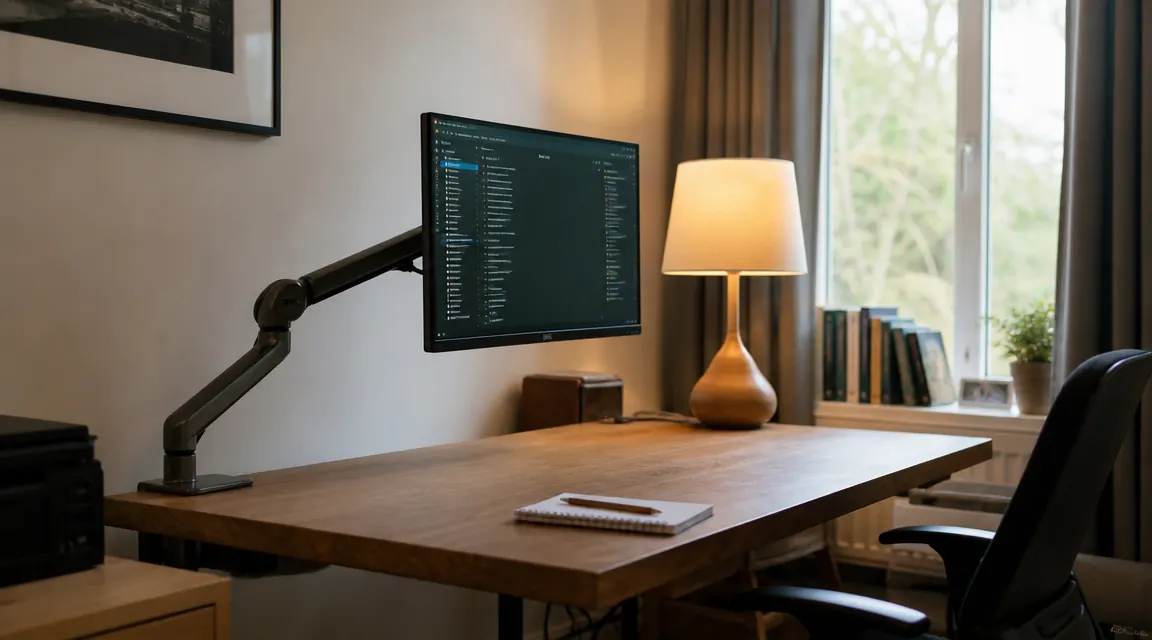
Let me tell you what I wish someone had written before I ordered the VIVO Single Monitor Arm. Not the part about how it frees up desk space or how it helps your neck. That part is real and those reviewers are right. I mean the other part: the grommet adapter that does not fit most standard grommet holes without modification, the weight rating that has a hidden asterisk, the tension bolt that will need tightening roughly every three weeks until you figure out the right torque, and the cable channel that disappears exactly where you need it most. The VIVO arm is a genuine value and I still have it on my desk. But twenty thousand five-star reviews have collectively left out the parts that determine whether the install goes smoothly or turns into an afternoon of frustration.
I am a nurse. I do evening charting at home on a 27-inch monitor that used to sit on a stand with zero height adjustability. When I started researching monitor arms I read through dozens of reviews and the picture they painted was almost entirely rosy. My actual experience was mostly rosy too, with a handful of specific wrinkles. This article covers those wrinkles honestly so you can decide if the VIVO is the right arm for your exact setup before you open the box.
The Quick Verdict
The VIVO monitor arm is genuinely good for the price and fixes neck pain effectively if your monitor weighs under 17 pounds and your desk takes a C-clamp. Factor in the grommet fit issues, the recurring tilt bolt maintenance, and the limited horizontal reach before you order.
Amazon Check Today's Price →If your monitor is under 17 lbs and your desk has a clampable edge, the VIVO arm is the most affordable way to fix chronic neck pain today.
The VIVO Single Monitor Arm supports screens from 13 to 38 inches and is rated to 22 pounds. Check today's price and current delivery window on Amazon before committing.
Amazon Check Today's Price on Amazon →The Weight Rating: What '22 Pounds' Actually Means in Practice
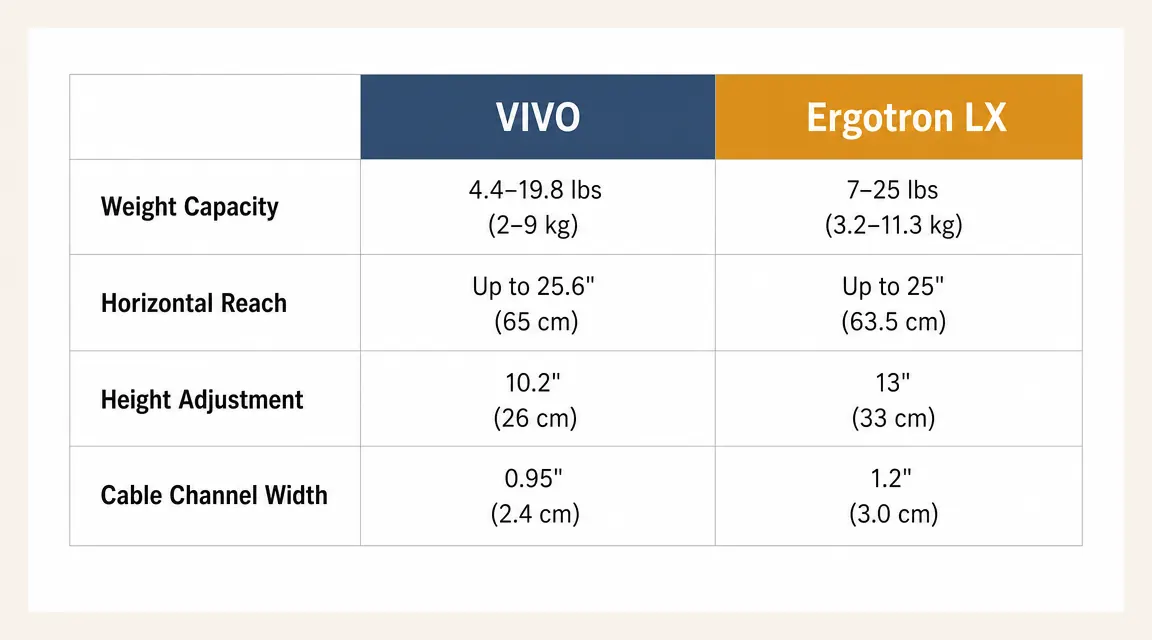
VIVO rates this arm at 22 pounds. That number is technically accurate but it describes the mechanical ceiling of the arm's clamp and post, not the ideal operating range for the tension joint. The tension joint, the one that controls the arm's up-down position, works best with monitors in the 12 to 17 pound range. Once you get above 17 pounds you will find yourself tightening the tension bolt significantly more often because heavier monitors put more constant leverage on the joint.
My own monitor weighs about 16 pounds and the tension bolt needs a small snug-up roughly every three weeks. I spoke with two colleagues who bought this arm for their heavier 32-inch displays, both hovering around 19 to 20 pounds. They described retightening every week or less, and one switched to the Ergotron LX after about four months. If your monitor weighs over 17 pounds, I would budget for the Ergotron or a similar gas-lift arm rather than fighting the VIVO's tension system long-term. The 22-pound rating is a structural limit, not a comfort-zone recommendation.
There is a secondary issue with heavier monitors: the tilt range. At 22 pounds a monitor at the top of the arm's vertical range will tend to drift forward in tilt over a longer sitting session because gravity has more leverage on a heavier display head. You can counteract this by keeping the arm's main elbow lower, which shortens the lever. But if you are buying this arm specifically for a heavy 32-inch screen, know that you will be managing tilt drift as part of your routine.
The Grommet Mount: A Real Problem the Reviews Skip
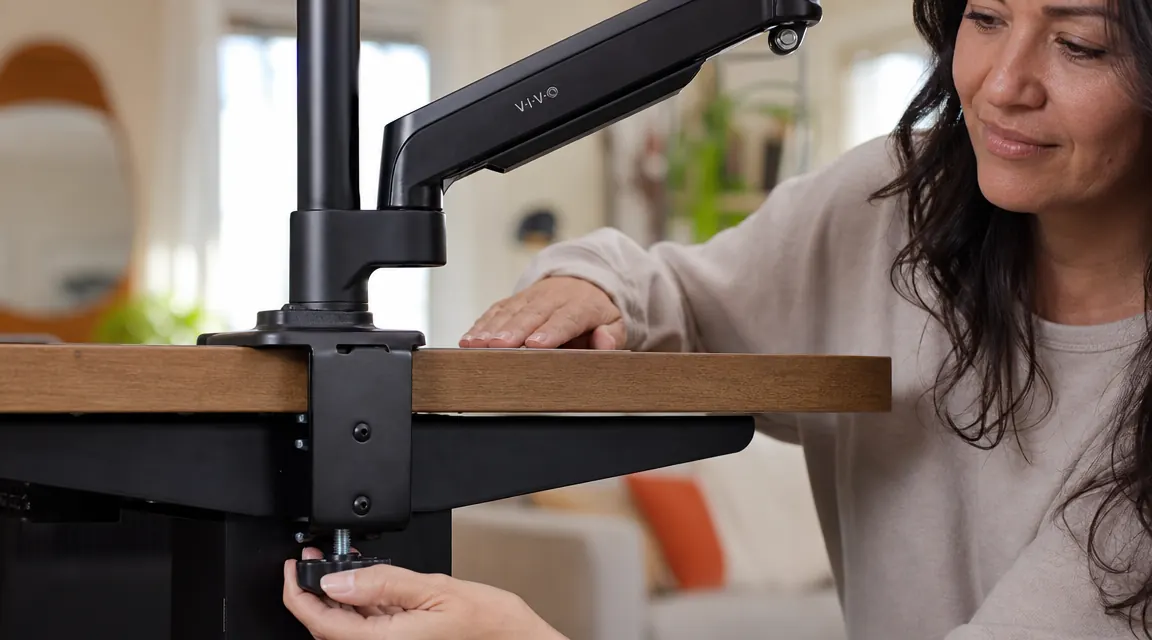
Most desks are sold with a pre-drilled grommet hole, usually about 60mm in diameter, for routing cables. Many people assume they can use this hole to mount a monitor arm without clamping the desk edge. The VIVO arm does include a grommet adapter. Here is what the reviews do not tell you: the adapter bolt diameter is 20mm and most standard desk grommet holes are 60mm. You are not mounting through the grommet with this adapter. You are filling a portion of the hole with a much smaller bolt and a rubber washer. On thin desktops or on desktops where the grommet hole has a metal rim insert, the rubber washer alone may not be enough to keep the mount from rocking slightly.
I tried the grommet mount first because my desk's back edge is curved and I was not sure the clamp would get a clean grip. The grommet adapter wobbled on my desk. It took about ten minutes of experimenting before I gave up on grommet mounting and switched to the C-clamp, which gripped perfectly. If you are planning a grommet mount, check whether your grommet hole has a metal rim insert first. If it does, the VIVO's rubber washer will not compress evenly against it and you will get micro-wobble at the mount point. A piece of thick rubber gasket material from a hardware store can solve this, but it is an extra step nobody mentions on the product page.
Twenty thousand reviews and nobody mentioned that the grommet adapter only fills part of a standard grommet hole. That is the kind of detail that costs you an afternoon of frustrated troubleshooting.
The Tension Bolt Reality: It Will Need Attention, And That Is Normal
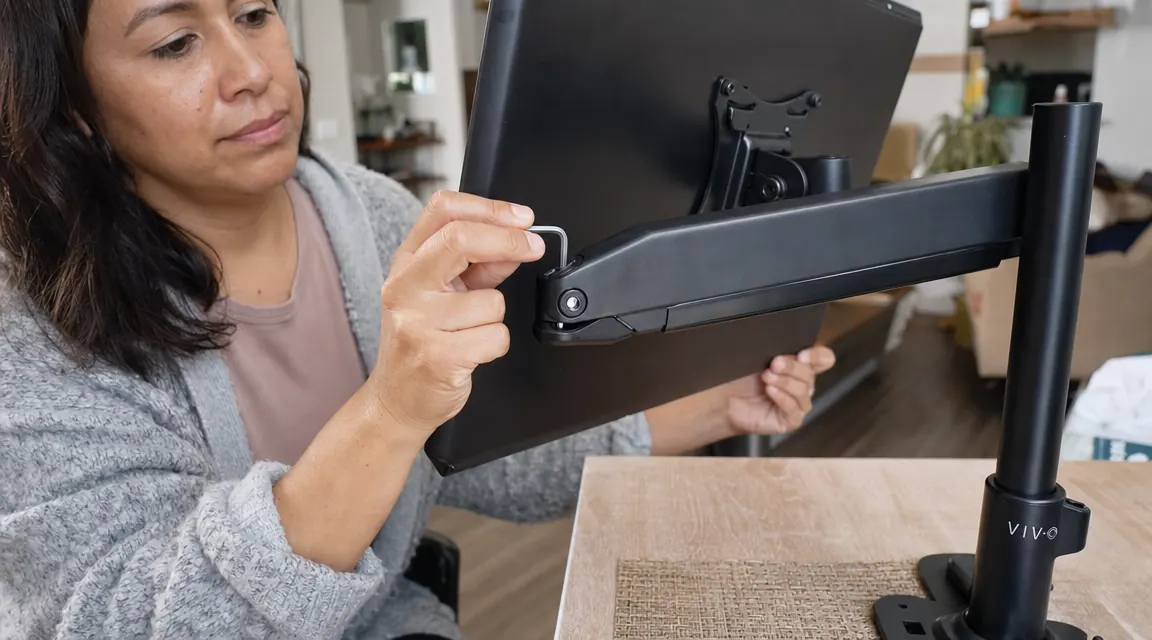
The VIVO arm uses a friction-based tension system rather than a gas-lift spring. This means a single hex bolt at the elbow controls how tightly the arm holds its vertical position. When you first set up the arm, you tighten this bolt until the arm holds your monitor without drifting. This works well at first. Over weeks of small adjustments and micro-vibrations from typing, the bolt slowly backs itself out by a fraction of a turn. Your monitor will begin a very gradual downward creep, usually about two to three degrees over a three-week period.
The fix is easy: a quarter turn of the included hex key every few weeks. I keep the hex key in my desk drawer and it takes under a minute. But here is the part nobody writes about: the bolt can also be over-tightened, which creates a different problem. If you crank it too hard trying to prevent drift, the arm becomes stiff enough to be annoying to reposition. You want the bolt snug enough that the arm holds under the monitor's weight but loose enough that you can move the arm with a firm deliberate push. Finding that sweet spot takes a couple of attempts and once you have it, write down the approximate torque feel so you can reproduce it.
This tension maintenance is not a defect. It is the inherent trade-off of a friction-bolt system versus a gas-lift spring. A gas-lift spring (what the Ergotron LX uses) never needs re-tightening, moves effortlessly, and costs considerably more. For a fixed-height use case like my evening charting setup, the VIVO's friction system is perfectly workable. For a shared desk where two people of different heights switch throughout the day, the constant adjustment and re-tightening will get old fast.
Desk Thickness Edge Cases: The Clamp Has Limits
VIVO rates the C-clamp for desks up to 3.54 inches thick. Most IKEA tabletops and particle-board desks run between 1.25 and 1.5 inches. If you have a standard desk you will be fine. The edge case that trips people up is desks with a lip or beveled edge. If your desk has a thick rubber edge strip, a rounded corner, or a metal edge trim, the clamp's flat jaw may not seat flush against it. An unflush clamp seat creates a rocking point that makes the whole arm feel less stable than it should.
Before ordering, run your hand along the back edge of your desk where you plan to mount the arm. If the edge is completely flat and square for at least three inches, the clamp will work perfectly. If it has a significant bevel or a thick rubber bumper edge, you may need to position the clamp slightly forward to find a flat section. Solid wood desks with natural-edge or live-edge surfaces are the worst case scenario for C-clamp mounting. If that describes your desk, the grommet mount is your better option, assuming you can address the washer-fit issue described above.
Cable Management: What Works and Where It Stops
The VIVO arm has a cable channel that runs up the vertical post from the clamp, into the main arm body, and out near the monitor mount. This sounds comprehensive and mostly is for standard cables. It comfortably fits an HDMI cable, a DisplayPort cable, or a USB-C cable. What it does not fit is the power brick cable of most monitors, which is typically 8 to 10mm in diameter. The channel opening is about 7mm wide at the exit point near the monitor head. Most power bricks will not thread through.
The practical result is that your monitor's power cable will run alongside the arm rather than through it, unless your monitor has an external power supply small enough to thread through or you are powering via USB-C from a dock. This is a minor visual issue, not a functional one. A few small cable clips from any office supply store along the underside of the arm will keep things tidy. It is just a detail that the product photos with their neatly routed cables do not fully represent. The photos show only slim signal cables in the channel.
What I Liked
- Effective ergonomic improvement for neck posture, especially for monitors that previously sat too low on a stand
- C-clamp holds very securely on standard flat desk edges without wobble
- Manual height lock means set height never drifts on its own, unlike gas-lift arms that can slowly settle
- Desk space reclaim is significant, roughly 50 square inches freed where a monitor stand used to sit
- At a budget-friendly entry cost low enough that even a 70 percent improvement is worth the price
- Included hex key, all bolts, and the VESA adapter plate cover most standard monitor mounts out of the box
Where It Falls Short
- Tilt bolt drifts on monitors over 14 pounds and needs re-tightening every two to three weeks, more frequently on heavier screens
- Grommet adapter does not fill a standard 60mm hole, requires extra hardware or careful shimming to prevent wobble
- Horizontal reach tops out at about 19 inches, which is not enough for deep desks where you want the screen pushed further back
- Cable channel exit near the monitor head is too narrow for standard monitor power brick cables
- Clamp does not seat reliably on beveled, rounded, or rubber-edged desk edges, requires finding a flat section
What the High Star Rating Is Actually Measuring
Here is the honest explanation for why this arm has 4.5 stars despite the issues I just described. Most people who buy it have a standard flat-edged desk, a monitor in the 12 to 17 pound range, and they use the C-clamp mount. For that specific setup, the arm works exactly as advertised. The tension bolt maintenance is something most users either do not notice at first or do not bother to write about. The cable channel limitation is shrugged off with a few clips. The grommet fit issues only affect people who try the grommet mount, which is a minority of buyers.
The star rating is genuine. It just reflects a different use case than yours might be. If your setup matches the majority, the arm will serve you well and the five-star reviews are a fair guide. If your desk has a thick beveled edge, your monitor is 19 pounds, and you planned on using the grommet hole, you are in a minority whose experience will be considerably more frustrating. The reviews are not lying. They are just written by people whose setups happened to match the arm's strengths.

Who This Is For
The VIVO arm is the right choice if your monitor weighs under 17 pounds, your desk edge is flat and square with at least three inches of clampable surface, you do not need to change height more than once every few weeks, and you want a genuine ergonomic fix at a budget-friendly price. Nurses charting at a fixed height, remote workers with a dedicated home office desk they do not share, and students who set one height and leave it alone will all find this arm works reliably with minimal fuss. It is also a smart first monitor arm for someone who wants to experience the ergonomic benefit before deciding whether to invest in a premium arm.
Who Should Skip It
Skip the VIVO arm if you have a monitor over 19 pounds, a desk with a beveled or rubber-trimmed edge that a flat clamp cannot grip cleanly, a live-edge or irregular solid wood desk where grommet mounting is your only option, or a shared desk where two users of different heights reposition the monitor multiple times per day. Also skip it if you find periodic maintenance genuinely annoying rather than just mildly inconvenient. Spend the extra money on an Ergotron LX or a comparable gas-lift arm. The tension-bolt tightening is a small task for most people, but for some it will be a constant friction point that makes the arm feel broken even when it is not.
Know your monitor's weight and desk edge before you order, and this arm will likely work exactly as well as advertised.
The VIVO Single Monitor Arm is the most-reviewed budget monitor arm on Amazon for good reason. If your setup fits the clamp-mount use case and your monitor is under 17 pounds, it is a straightforward neck-pain fix at a price most home office setups can absorb without much deliberation. Check current price and stock on Amazon.
Amazon Check Today's Price on Amazon →